Image Generation
Image AI Influencers
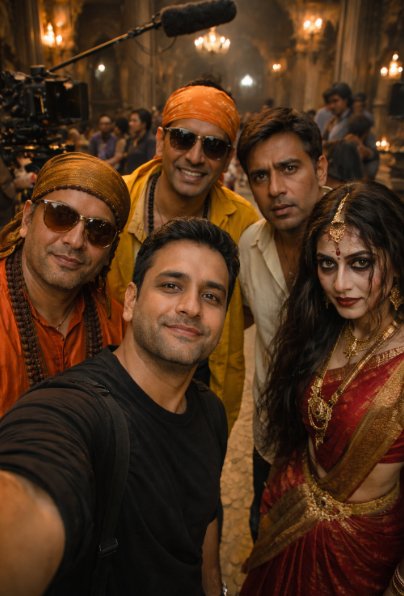
Behind-the-scenes cinematic selfie photo from a Bollywood movie shoot Bhool Bhulaiyaa
Behind-the-scenes cinematic selfie photo from a Bollywood movie shoot Bhool Bhulaiyaa
Prompt
Scroll to read allUltra-realistic behind-the-scenes cinematic selfie photo from a Bollywood movie shoot.
Me (same face, same identity, realistic skin texture, natural expression) holding the camera at arm’s length like a front-camera smartphone selfie, slight wide-angle distortion, candid framing.
Standing next to me are the main characters from Bhool Bhulaiyaa (2007), including Manjulika, grouped naturally together as if the scene is paused between takes.
All characters are wearing the exact same outfits as in the movie, unchanged in any way â€" same colors, same fabrics, same fit, same accessories, same hairstyles and makeup, screen-accurate detailing.
Manjulika appears exactly as in the film â€" traditional attire, hair, makeup, expression, and presence fully screen-accurate, no reinterpretation.
No changes to costume, styling, pose, or expressions. Only the camera perspective is a selfie.
Background: a live movie shoot BTS environment â€" visible film crew standing in a queue behind the actors, assistant directors with headsets and scripts, camera operators, cinema camera on rig/tripod, boom microphone overhead, light stands, reflectors, cables on the floor, clapperboard nearby.
Setting feels like the actual set during a short break between takes, not a staged photoshoot.
Lighting: natural cinematic indoor palace lighting mixed with professional set lights, realistic shadows, soft contrast, no artificial glow on skin.
Style: highly photorealistic, candid behind-the-scenes moment, looks like a real BTS selfie clicked casually during the Bhool Bhulaiyaa shoot.
Camera look: iPhone front camera style, visible skin pores, natural sharpness, no beauty filters, no smoothing.
Ultra-detailed, 8K realism, cinematic color grading, documentary BTS feel.
Aspect ratio: 9:16 (vertical)
Upload your own photo and add "Create a portrait with the same facial features as the uploaded reference image" to the prompt for a personalized result.